Setting Live & Animated Wallpapers — iOS, Android, Windows
Step-by-step how to use animated wallpapers on every major platform.
Animated wallpapers feel like magic when they work and incredibly broken when they don't. Each OS handles them differently. Here's the practical guide.
iOS — Live Wallpapers
Requirements: iPhone 6s or newer (Live Photo support). Live Wallpapers are removed from iOS 17+ on the lock screen — only home screen Live Photos remain.
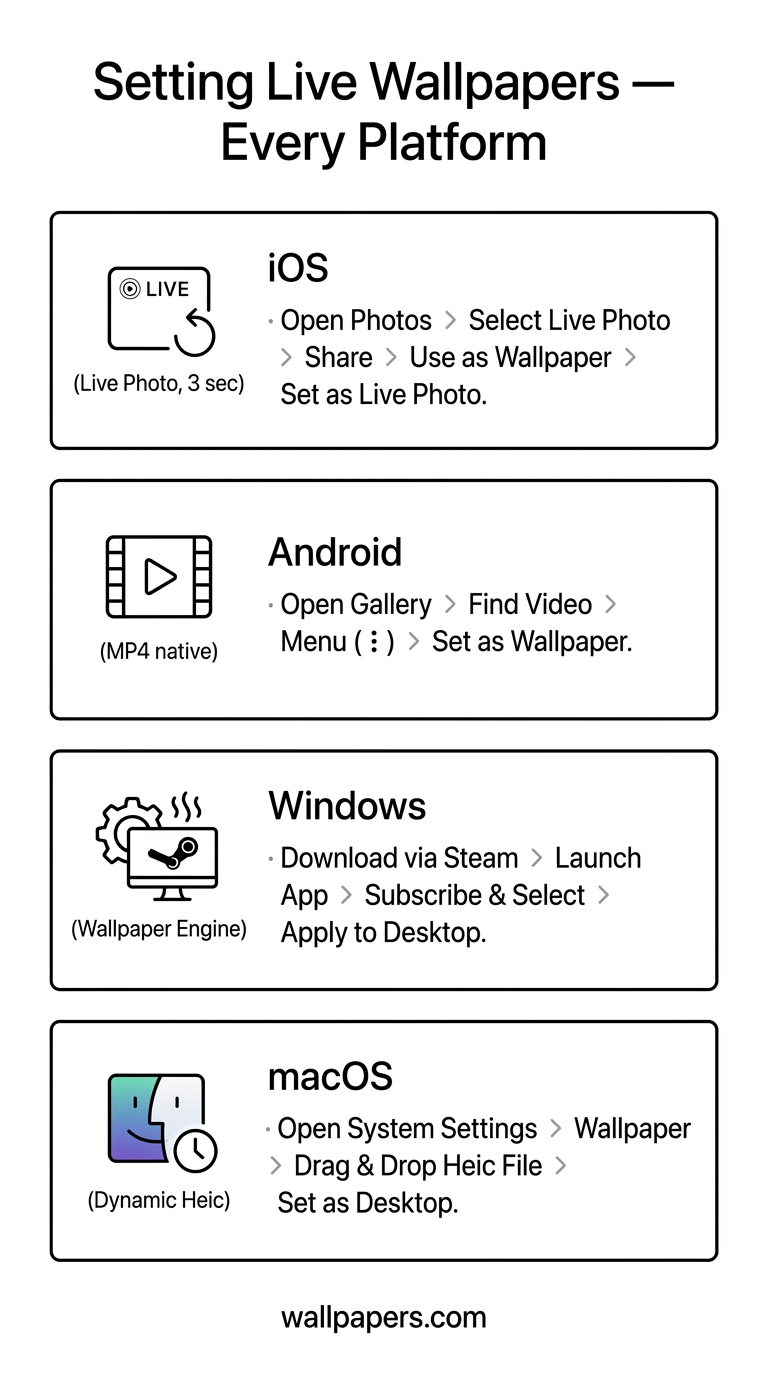
- Take or create a Live Photo (3-second video clip).
- Settings → Wallpaper → Add New Wallpaper → Live Photos.
- Pick the photo, tap Set, choose Lock Screen and/or Home Screen.
- Long-press the lock screen to play the animation.
Convert any video to Live Photo format with our live wallpaper converter.
Android — Live Wallpaper apps
Android natively supports Live Wallpapers via apps. Files use formats like MP4, GIF, or specialised .lwp packages.
- Install a Live Wallpaper app (e.g., KLWP, Muzei, Walli).
- Long-press the home screen → Wallpapers → Live Wallpapers.
- Pick a source video or animation.
For native MP4-as-wallpaper without an app, Pixel and Galaxy (One UI 5+) have built-in support — go to Wallpaper settings → Browse, pick an MP4.
Windows — DeskScapes / Wallpaper Engine
Windows doesn't natively support animated wallpapers. Two paid options: Wallpaper Engine (Steam, $4) and DeskScapes. Both accept MP4, WebM, GIF, and even shader-based animations.
Free workaround: VLC's "Set as Wallpaper" mode — plays a video as a desktop background while VLC is running.
macOS
macOS Sonoma+ has native dynamic wallpapers (time-of-day shifting, like the built-in landscape pack). For true animated MP4 wallpapers, use third-party apps like Plash or AnyWall.
File format reference
| Platform | Format | Max length | Resolution |
|---|---|---|---|
| iOS Live Photo | HEIC + MOV | 3 sec | 1080×1920 |
| Android (native) | MP4 (h.264) | 10 sec | Match screen |
| Wallpaper Engine | MP4 / WebM / Shader | Unlimited | Any |
| macOS Dynamic | HEIC (multi-frame) | — | 5K+ |
Converting any video clip
Our live wallpaper converter takes any MP4 or GIF, trims to the right length, and exports the format your target platform expects.
Try our free tools
- Image resizer — pixel-perfect downscale + upscale.
- Convert to WebP — 30-50% smaller files than JPG.
- Background remover — one-click cutout.
- Social-media resizer — every platform's exact dimensions.
- Bulk processing — apply any tool to up to 200 images at once.
Browse the full tool catalog or our other guides.