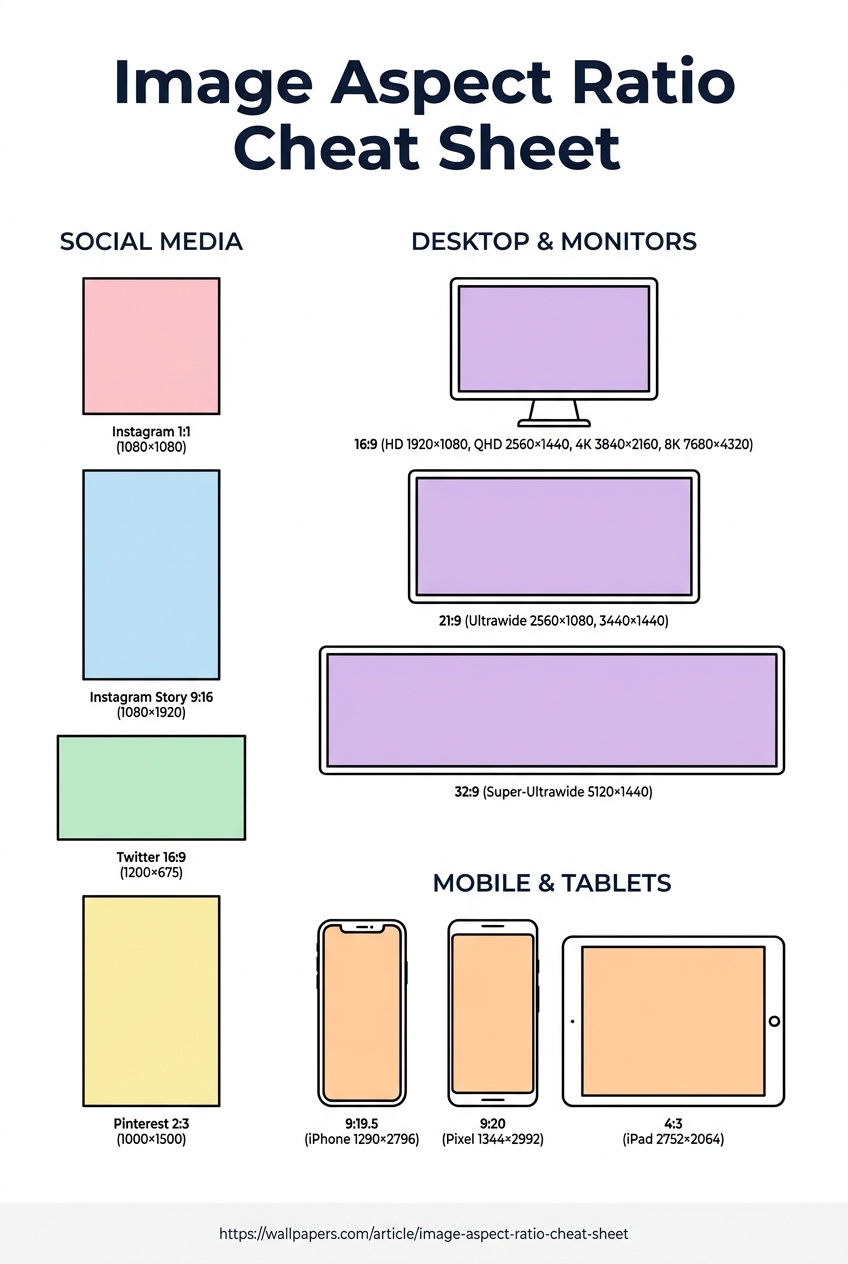
The Complete Image Aspect Ratio Cheat Sheet
Every social platform, every device, every screen size — in one reference table.
Choosing the wrong aspect ratio is the single most common reason an image looks bad after upload. Each platform crops differently, and what reads beautifully on a 16:9 desktop screen can look stretched or cut on a 9:16 phone story.
This cheat sheet is the reference we wish we'd had — the exact pixel dimensions for every place an image actually lives. Bookmark it, print it, share it.
Social platforms
| Platform | Format | Aspect | Pixels |
|---|---|---|---|
| Square post | 1:1 | 1080 × 1080 | |
| Portrait post | 4:5 | 1080 × 1350 | |
| Story / Reel | 9:16 | 1080 × 1920 | |
| Cover | 205:78 | 820 × 312 | |
| Post | 40:21 | 1200 × 630 | |
| Twitter / X | Header | 3:1 | 1500 × 500 |
| Twitter / X | Post | 16:9 | 1200 × 675 |
| Cover | 4:1 | 1584 × 396 | |
| YouTube | Thumbnail | 16:9 | 1280 × 720 |
| TikTok | Video | 9:16 | 1080 × 1920 |
| Pin | 2:3 | 1000 × 1500 |
Need to resize a single image to all of these in one click? Use our free social-media template tool — drop one photo, get a ZIP of every platform's correct version.
Desktop wallpapers
| Screen | Aspect | Pixels |
|---|---|---|
| Standard HD | 16:9 | 1920 × 1080 |
| QHD / 2K | 16:9 | 2560 × 1440 |
| 4K UHD | 16:9 | 3840 × 2160 |
| 5K (iMac) | 16:9 | 5120 × 2880 |
| 8K UHD | 16:9 | 7680 × 4320 |
| Ultrawide 21:9 | 21:9 | 3440 × 1440 |
| Super-ultrawide 32:9 | 32:9 | 5120 × 1440 |
Browse our desktop wallpapers in any of these sizes — every wallpaper renders in HD, 4K, 5K, and 8K (Premium).
Mobile devices
| Device | Aspect | Pixels |
|---|---|---|
| iPhone 15 Pro Max | 9:19.5 | 1290 × 2796 |
| iPhone 15 / 14 / 13 | 9:19.5 | 1170 × 2532 |
| iPhone SE (3rd gen) | 9:16 | 750 × 1334 |
| Samsung Galaxy S24 Ultra | 9:19.3 | 1440 × 3088 |
| Google Pixel 8 Pro | 9:20 | 1344 × 2992 |
| iPad Pro 13" | 4:3 | 2752 × 2064 |
| iPad Pro 11" | 4:3 | 2420 × 1668 |
Looking for the exact aspect for your phone? Our aspect ratio converter auto-crops any image to your target.
How to use this cheat sheet
Save the infographic below — it's free to share, print, or pin to your design wall. We just ask that you link back to this article.
Try our free tools
Most of these guides pair with a hands-on tool you can use right now — no sign-up required for the first run:
- Image resizer — pixel-perfect downscale + upscale.
- Convert to WebP — 30-50% smaller files than JPG.
- Background remover — one-click cutout, transparent PNG.
- Favicon generator — every browser size from one source.
- Social-media resizer — every platform's exact dimensions.
- Bulk processing — apply any tool to up to 200 images at once.
Browse the full tool catalog.